Take field reports off paper and into your own software
Ultineo SaaS builds custom software with you, from the everyday work of your teams on a site, on the road or on the shop floor. You follow its construction phase by phase and test each version before the people who depend on it receive it.
Where information gets lost between field and office
- Reports written on paper
A site diary, a delivery note or a shift log is filled in by hand, then copied into a spreadsheet when someone finds the time. When your application replaces a manual tool, you identify the rules your teams already rely on, then separate the information and decisions that should remain from the changes you want.
- Teams far from the office
Drivers, site crews and operators work where the job is, and the office often learns what happened only afterwards, by phone. Your brief describes a concrete situation, who opens the application, what information they enter and what they need to achieve, with the important exceptions and constraints instead of a list of desired screens.
- Systems already in place
A management system, a planning tool or accounting software already holds part of the information, and nobody wants to enter it twice. During project preparation, you provide the documents, examples and service documentation that explain your current activity, and you state which parts should remain and which should change.
What you want to do, and where it is explained
- Route a request between departments
A maintenance request or a quality report passes from the workshop to the office and back before anyone decides. The page shows how you state who submits, who decides and what happens in each state, then publish a version your team has tested.
- See the stages of a project
From the scope you prepare to the hosting behind the service, the page takes a software project in order. It is written for a business that knows its work in detail and has no development team.
- Change a screen in service
A new machine, a new customer requirement or a new depot ends up changing a form. The page explains how a change is described on the existing page, tested in development, then published in a reviewed version.
- Add reasoning to your own software
Ultineo Reasoning is a separate product with its own access, and its API adds a reasoning step to an existing screen of your software: a summary, a suggested reply, a classification. The page covers what an integration has to settle, from the project key to reading a run back.
- Use a service you already run
An external connection describes how your application uses another service. You declare its name and its documentation, supply the access details requested for testing and production, and associate it with the business areas that use it.
Let another system use the operations you agreed
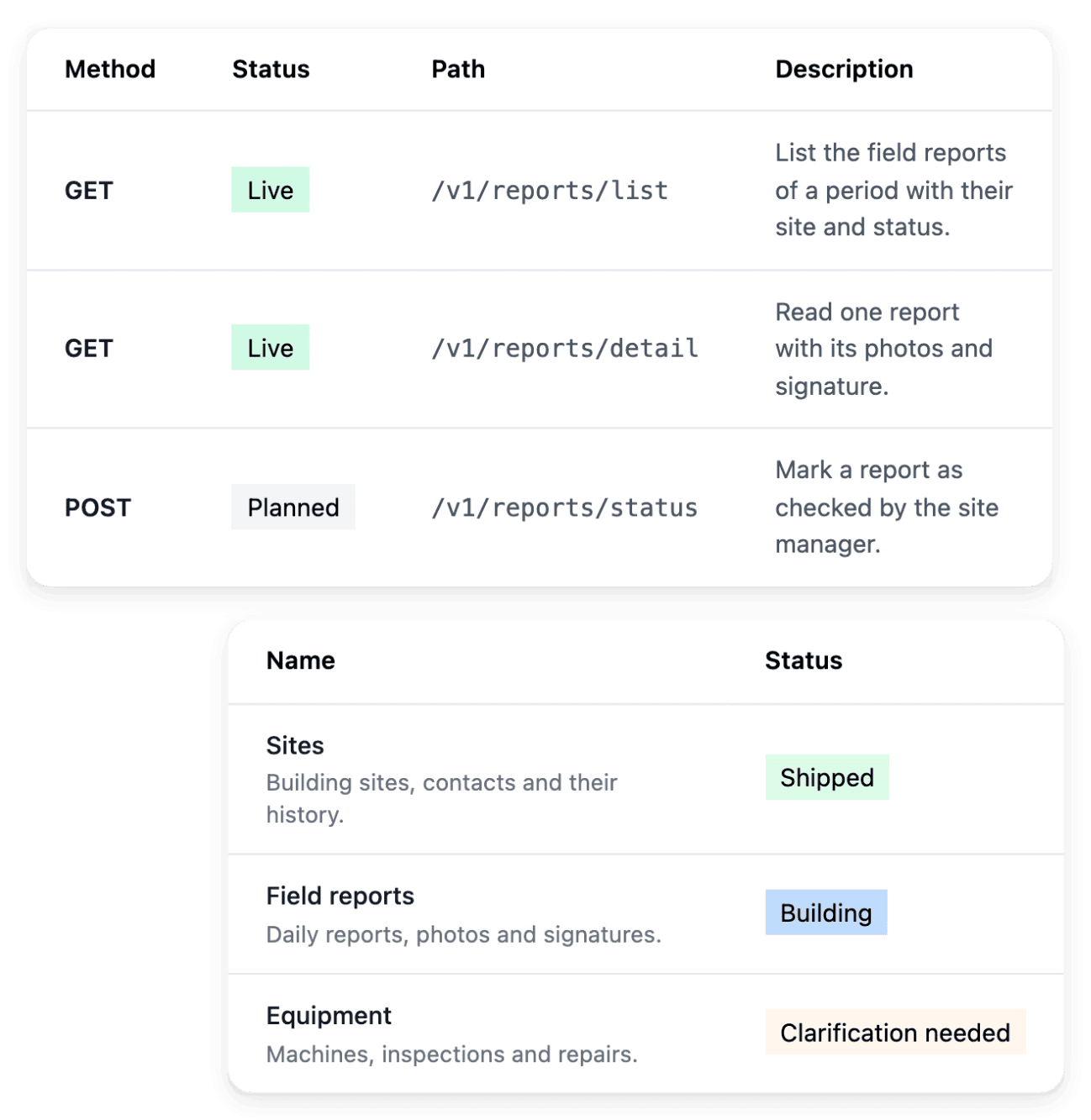
A planning tool or a management system may need to read what your teams record in the application. The project API exposes the agreed operations of your application: you identify who will consume the project’s data and which operations that integration requires. The API tools organize the proposed routes by business area, and clarifications help define what each operation should do before its implementation.
The project API is an optional part of the offer: its availability appears in the actual offer of your project, and an application can operate without activating it. A planned route is not a working endpoint, so use the state shown in the route catalogue and the published reference before starting an integration.
Know which part of your software is being built
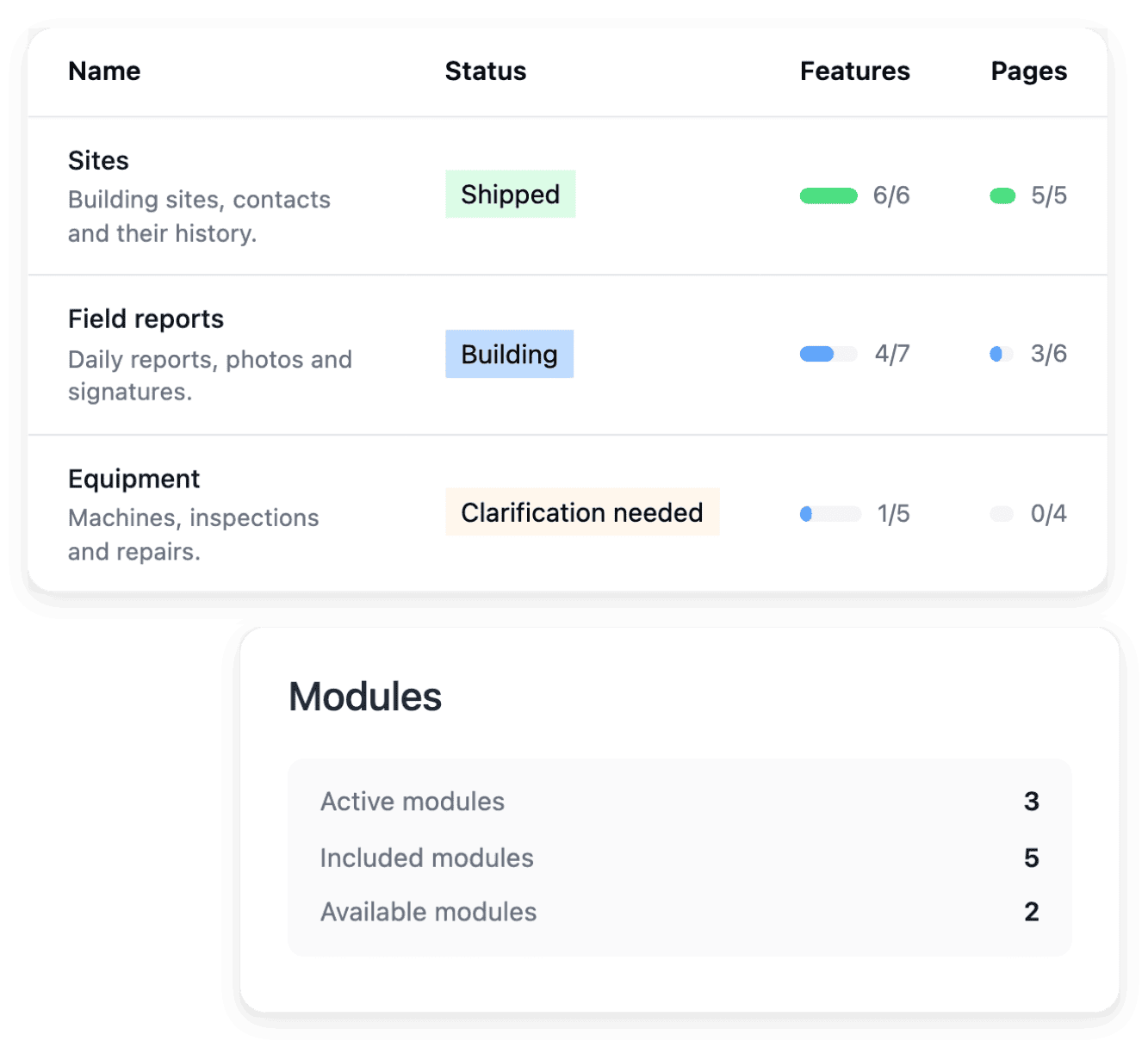
You already plan a building site or a production run in phases, and the construction of your software reads the same way. A change that involves more than one screen or action gets a roadmap, which gives a view of the construction phases and of the work attached to them. Keep your review tied to the planned pages and actions: when a new need changes the scope, describe it clearly, since a progress indicator is not evidence that it is already included.
A roadmap is launched for a business area whose functions or pages are ready and whose required storage is available. When work is waiting, complete the question or the prerequisite in its context rather than launching a duplicate of work already being prepared.
Test a version before your teams depend on it
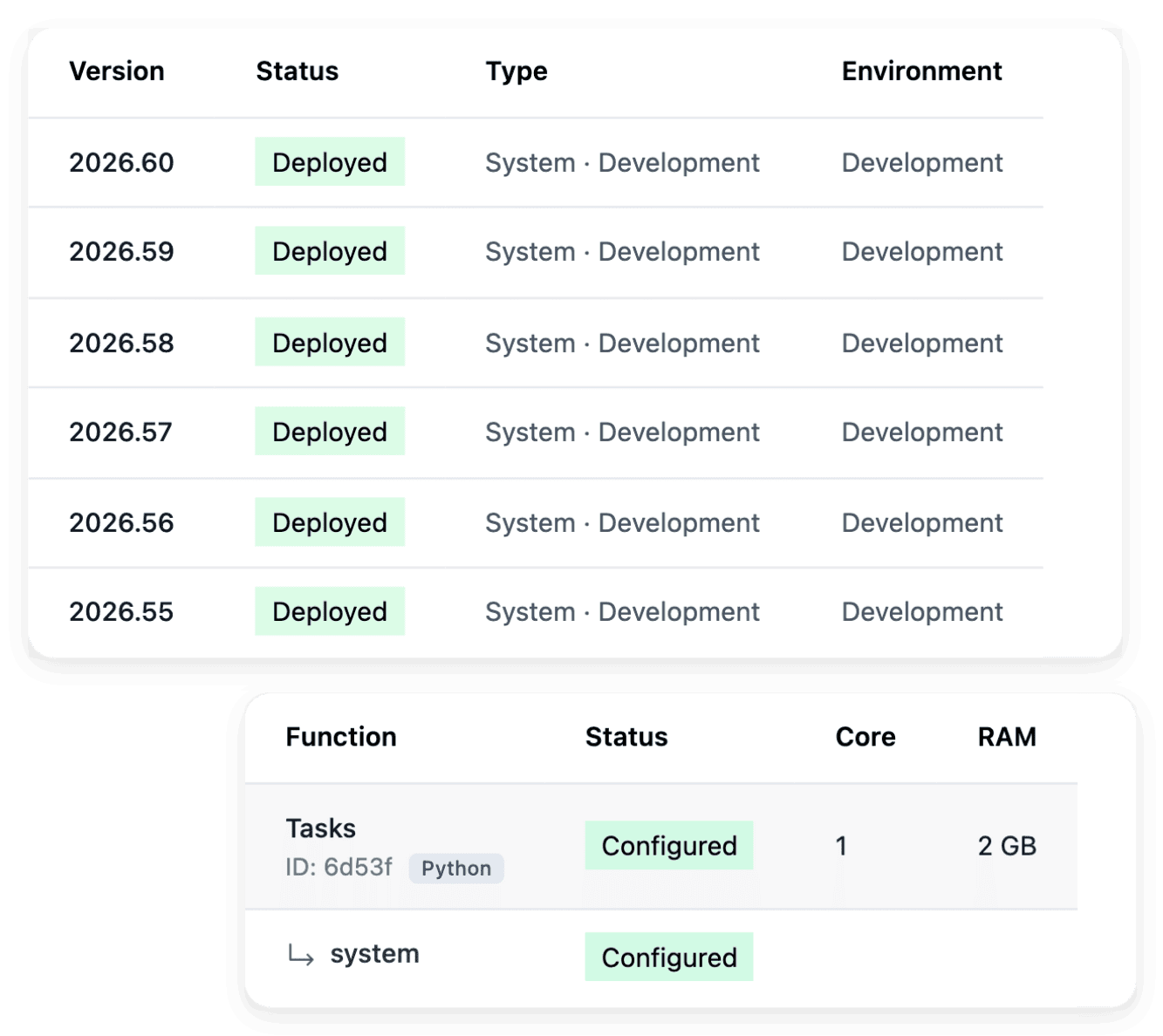
Taim, depo või koht ei saa seista ainult sellepärast, et ekraan muutus öösel. Jooksev töö jõuab arendusse ja tootmine teenindab versiooni, millele kasutajad toetuvad. Eeltootmine on valik, mis projekti saab lisada, arvestades selle tööaja tundidega, et kontrollida valitud väljalannet vahetult: kinnitate nii selle kättesaadavust kui ka tööle jäävaid versioone ning testite avaldamisega seotud kasutajate teekondi.
Starting an environment restores its availability; it does not select a new version, which is what a deployment does. After a deployment, verify the version and the user journey in production before telling your teams that a change is live.
Typical starting scope
For each trade, the business areas a first version usually holds and the level that fits. It is a first proposal, not a template you pick: we review it with you against the way your team works, and you change, add or remove areas before anything is built.
- Construction and building trades
First version: jobs and sites, site diary, quotes and variations, snags and handover, each filled in from a phone on site.
Level that fits: Level 1. Level 2 adds subcontractors and their work orders.
Ultineo Reasoning applications: Quote Line Builder, Site Diary Recap, Snag List Extractor, Variation Order Notice.
- Transport and logistics
First version: transport orders, delivery incidents, drivers and vehicles, a customer portal where shippers book and follow their orders.
Level that fits: Level 1, often with the API option so that your planning software reads what the application records.
Ultineo Reasoning applications: Delivery Exception Triage, Freight Enquiry Extractor, Driver Debrief Recap, Vehicle Defect Triage.
- Manufacturing and maintenance
First version: maintenance requests, shift log, equipment register, quality and nonconformities.
Level that fits: Level 1. Level 2 adds deviation notices to suppliers and their answers.
Ultineo Reasoning applications: Production Shift Handover, Downtime Reason Coder, Nonconformance Report Draft, Machine Fault Triage.
- Cleaning and facility services
First version: sites and contracts, work orders and call-outs, quality audits, staff and rota.
Level that fits: Level 1. Level 2 adds a client portal for requests and the monthly service report.
Ultineo Reasoning applications: Quote Scope Builder, Site Audit Scorecard, Work Order Rewriter, Monthly Service Report.
Rakendused sellele tegevusalale: Koristus ja kinnisvarahooldus
Level 1 holds 4 business areas, Level 2 holds 5 and a showcase website, Level 3 holds 6 and a dynamic website.
AI applications for plants, fleets and building sites
Ultineo Reasoning holds ready-made applications for these trades in its catalogue. In a plant, you write the production shift handover, code each downtime reason and draft a nonconformance report; in transport, you extract a freight enquiry, triage delivery exceptions and recap a driver’s debrief; on a building site, you turn a job description into quote lines, recap the site diary and extract a snag list. Each card of the catalogue opens the application: what it does and the fields it asks for.
Rakendused sellele tegevusalale: Ehitus ja oskustööd
Selle taga olevad funktsioonid
- Valikuline projekti API
Vaadake läbi API ulatus, mis on sobiva projekti jaoks, ja eristage planeeritud marsruute juba välja töötatud lõpp-punktidest.
- Roadmaps
Jagage projekti areng nähtavaks faaside järgnevuseks ja järgige iga teekonna ulatust.
- Areng, katsetus- ja tootmisetapp
Kasutage eraldi keskkondi versiooni koostamiseks, testimiseks ja rakenduse kasutajatele käitamiseks.
- Projekti ettevalmistamine
Muutke oma idee selgeks ülesandeks, lisades äri konteksti, kasutajad ja praktilised piirangud, mis on vajalikud alustamiseks.
- Funktsionaalsed spetsifikatsioonid
Enne töötava ekraani loomist vaadake üle, mida funktsioon või leht peaks tegema.
- Ärivaldkonnad
Organiseerige rakendus teie ettevõtte valdkondade järgi, seejärel vaadake läbi iga valdkonna funktsioonid ja lehed.
- Välised ühendused
Kirjeldage väliseid teenuseid, millega ühendus tuleb luua, esitage nende dokumentatsioon ja seostage need asjakohaste ärivaldkondadega.
- API
Run your reasoning from any software.
Edasi lugemiseks
- Seotud juhendid
- Ultineo Reasoning
Start with one report your teams still fill in by hand
Tell us what the software must manage, who will use it and what it replaces today: each application to join is reviewed by our team before the project is opened.
Küsimused
No. In Ultineo SaaS, the business areas of your application are proposed from your brief, and you review them and answer the questions before construction. A business area groups related work, such as customer management or scheduling, and its functions and pages describe how that work will be carried out in the application. Project offers include a number of business areas, so check the corresponding offer when an additional area is needed.
Yes, and project preparation advises it: choose a small, useful outcome for the first version, with one team, a familiar process and a result you can check. Later ideas stay visible without each one becoming a requirement for launch. When the scope grows afterwards, review the effect of the extension on the offer and on the publication process rather than treating it as already included.
Ei. Arendus ja eeltootmine, kui projektil see on olemas, saab vajadusel peatada vastavate juhtimiseks pakkuvate vahenditega ja järgid sa saadud olekut: taotlus ja tegelik peatus olek on erinevad etapid. Nende tööaeg on registreeritud majutuse kasutamise jaoks, samal ajal kui tootmine järgib oma tellimust. Enne testi veendu, et vajalikud keskkonnad on kättesaadavad.
No. Ultineo SaaS and Ultineo Reasoning are separate products, each with its own access and its own pricing page, and the API runs your reasoning from any software. API access is included with Ultineo Reasoning, which has no self-service account: our team opens your project and hands you its first key. The optional API of a software project is another thing: it exposes the agreed operations of your own application.